This is weird. MacZot is selling an unknown application for $5.95 and saying that it's being or will be developed by a team of young coders. There is also some discussion about this being part of a story - I can't really understand it.
My first thought is that they are selling the app that's going to be developed by the My Dream App group, as many of the participants worked on apps featured by MacZot in the past - such as AppZapper, SubEthaEdit, and iClip.
But now, I'm not sure - the MacZot post is very vague...
UPDATE: Actually, the StoryZot was for 3 apps, not one. And these were revealed as: KIT, rooSwitch, and HawkEye. Good deal? Not sure.
Wednesday, August 30, 2006


My Dream App
 This is a bit late, but here's a chance to submit your application idea, have it judged by a (Mac) celebrity panel, and have it created by a team of hip Mac Developers. It's called "My Dream App". My Dream App (MDA) is a unique contest of sorts, and to date there are over 2300 idea submissions. There's a discussion board so you can float your idea and have it critiqued, as well as general discussion about the MDA concept.
One thing though - you have to submit your idea by NOON August 30. That's like... now.
Saturday, August 19, 2006
MLB.com Mac-UNfriendly
 I've subscribed to MLB's Game Day audio since it came out a few years ago. Living in Japan, it was great to get live baseball audio in English to add a bit of sanity to my days. It was great to listen to at work or home in the mornings ( I work evenings). I grew up with baseball on the radio, so I've never missed the visual part.
At first I was annoyed that MLB took control of all local radio broadcasts, as I was always tuning into them on internet feeds from radio station. However, with MLB Game Day I could get any game I wanted live or archived. And for the entire season, it was always reasonably priced (~$15 this year, less after the season is half over).
I could always open the feed in Safari on the Mac, and in fact the FAQ on the site
says still Safari is the recommended Mac browser for GameDay Audio. At the beginning of this season, however, it became clear that Safari was no longer compatible, though the FAQ did not say this. You'll get a warning message, saying Safari isn't recommended. So, I used FireFox for MLB audio, and it worked fine, until a week before the All Star Break.
Essentially, I can no longer get any audio feed after you log into the site and choose your games. Zip - nothing - zilch. This is true for every browser available on the Mac (OK, didn't try OmniWeb) and on both of my Macs. I was able to get one feed in the last month - the AllStar game as covered by MLB radio. But none of the radio feeds work at all. And I've done nothing I can think of which would affect the playing of the audio stream, which apparently uses the WMV Flip for Mac plug-in.
I wrote MLB to alert them of the problem in July. They sent me this reply:
--------------------
"Thank you for taking the time to contact us.
We've been having troubles with Macs and Game Day Audio lately.
The older Macs (PowerPC's, non-Intel) that are running 10.4.7 work fine
with the Windows Media Plugin, the problems tend to be with the newer
Intel Dual Core machines. Basically the WMP plugin is not being
recognized and Microsoft isn't supporting it anymore. Flip4Mac, which
was a workaround, hasn't 'officially' released anything that is
compatible for the new Intel Macs yet, so we're stuck between a rock and
a hard place. There is a BETA version of it which I did see work just
now. This hasn't been released officially, although they state it's
scheduled for release soon. We should have a solution to this problem
very shortly.
Thank you for your patience.
Regards,
DB, MLB.com Support"
--------------
I wrote back explaining that I didn't have an Intel Mac and that the problem had to be on their end, as I hadn't changed anything on my Macs.
This is the reply they sent me:
------
"Dear Fan,
Thank you for sending your email. We really appreciate your feedback and
comments and have forwarded your email to the appropriate person.
Thank you again for taking the time to write!
Regards,
JB, MLB.com Support"
--
I replied that their appreciation was not a factor, and that I wanted the issue fixed right away.
So, they (actually a customer response person) sent me the EXACT SAME first response, about problems with Intel Macs. It's insulting to get canned responses, but even more insulting when they don't deal with the problem at hand.
I'm unsure how many Mac users there are of MLB Game Day Audio, but I think I've had enough. I've missed so many great Tigers games in the last month, and am absolutely seething at this point. Looks like ultimatum time.
Tuesday, August 08, 2006
WWDC Keynote Hair of the Dog
Well, it looks like nothing on my wish list was announced. But 2 of my 4 reality check items were displayed: Leopard preview and Mac Pros.
Mac Pros
The Mac Pros seem to fit the bill, with fast quad core 64bit Xeon processors running up to 3 GHz. They use the same familiar enclosures the last G5 PowerMacs have and dual layer optical drives. You can see the specific stats here.
My take - these are nice additions to the MacIntel line and allows Apple to say it completed its transition on time. However, expect quality and design problems, as we saw with the early MacBooks and MacBook Pros, especially if these were rushed to market.
Leopard Preview
You gotta like Apple twisting the little knife it has embedded in Microsoft's side. But I wonder if this will piss of MS and keep them from developing Office Apps on OSX - or at least slow them down. MS today announced they would no longer develop VirtualPC - but that's a no brainer. MS is behind the ball, given BootCamp and Parallels are already vialble and available. And face it - why work on developing emulator software for Mac when you can't even get your own OS released?
Jobs and other Apple folks introduced 10 basic improvements or new features for Leopard.
64-Bit Goodness
Leopard is supposed to be 100% 64-bit, with ability to support older 32-bit apps.
My take: One wonders if this will extend to non-Intel Macs.
Time Machine
This slick looking app will work automatically to back up files automatically and supposedly allows people to go back in time for any app to retrieve files lost.
My Take: Better get a separate hard drive for this one. Also, it's not clear to me that this will be more functional that current back-up apps like SuperDuper or even a recently announced Synk 6, but we'll have to see. You gotta like the icon, though. :-)
Boot Camp, Front Row, PhotoBooth Standard
Now, these apps will be available for all Macs with Leopard. I think.
My take: We'll have to see if Boot Camp works with non-Intel Macs.
Spaces
This is a 'desktop manager' that will allow users to switch between 4 different desktops. This allows different working environments on the same Mac - customized and optimized for the purpose at hand.
My take: The problem is that this feature is already available for Macs via the freeware Virtue. (Note: the Virtue link isn't functional as yet, and the MacUpdate download link is down too.) I worry that Apple is ripping off another small developer's idea without giving credit (See Konfabulator vs. Dashboard comparisons...)
Enhanced Spotlight
This was not demonstrated, but Apple claims the new Spotlight can search and index another Mac or network servers, and feature an integrated application launcher and recent item information usage.
My take: So? Can't I already search external devices and mounted volumes? Furthermore, it sounds like Apple is zero-ing in on the feature set of Quicksilver. Again, stealing from the developer base is not cool Apple, unless you give credit where it is due.
Core Animation
This feature allows developers to enhance visual aspects of apps with much less coding.
My take: OK...
Improved Universal Access
Apple will improve the computer speech, QT closed captioning and more.
My take: Good - Now do we need a new OS release for these things?
Enhanced Mail App
The new Mail will have stationary, Notes, To Do's.
My take: Ummm... So they want to make Mail MORE like Entourage? Mail doesn't need this complexity, IMHO. Hell, I'll be happy if they just make it compatible with my employer's Exchange mail server.
Dashboard Improvements
Leopard's Dashboard will be improved - perhaps with the ability to run Widgets on the desktop. Apple will also make available consumer and developer apps for creating widgets.
My take: Ho hum...
New iChat
Apple will enhance iChat to allow tabbed chats, animated buddy icons, multiple logins, PhotoBooth effects, and more.
My take: Hello Apple? Heard of Chax? Most of this stuff is ho-hum anyway, as I can't get many of my relatives or long-distance friends to use iChat or even Macs at all.
Summary
There were a few other Leopard features mentioned or hinted at, and the rumor sites have been adding more. However, I can't get over how most of Leopard features are really incremental in nature. Cult of Mac on the Wired site comments that this is because OSX is already a mature OS that only needs tweaking. I partially agree with this, as the model is working well for me so far. The author, Leander Kahney, also comments on how Jobs did not impress with this keynote, looked sickly, and had others help him present. I don't know about that, as I'm not into watching Keynotes. However, I can say I wasn't that impressed with what was announced. I suppose we all want something better than the Hi Fi. And I want something that doesn't push currently available apps to the endangered species list without some compensation.
Mac Pros
The Mac Pros seem to fit the bill, with fast quad core 64bit Xeon processors running up to 3 GHz. They use the same familiar enclosures the last G5 PowerMacs have and dual layer optical drives. You can see the specific stats here.
My take - these are nice additions to the MacIntel line and allows Apple to say it completed its transition on time. However, expect quality and design problems, as we saw with the early MacBooks and MacBook Pros, especially if these were rushed to market.
Leopard Preview
You gotta like Apple twisting the little knife it has embedded in Microsoft's side. But I wonder if this will piss of MS and keep them from developing Office Apps on OSX - or at least slow them down. MS today announced they would no longer develop VirtualPC - but that's a no brainer. MS is behind the ball, given BootCamp and Parallels are already vialble and available. And face it - why work on developing emulator software for Mac when you can't even get your own OS released?
Jobs and other Apple folks introduced 10 basic improvements or new features for Leopard.
64-Bit Goodness
Leopard is supposed to be 100% 64-bit, with ability to support older 32-bit apps.
My take: One wonders if this will extend to non-Intel Macs.
Time Machine
This slick looking app will work automatically to back up files automatically and supposedly allows people to go back in time for any app to retrieve files lost.
My Take: Better get a separate hard drive for this one. Also, it's not clear to me that this will be more functional that current back-up apps like SuperDuper or even a recently announced Synk 6, but we'll have to see. You gotta like the icon, though. :-)
Boot Camp, Front Row, PhotoBooth Standard
Now, these apps will be available for all Macs with Leopard. I think.
My take: We'll have to see if Boot Camp works with non-Intel Macs.
Spaces
This is a 'desktop manager' that will allow users to switch between 4 different desktops. This allows different working environments on the same Mac - customized and optimized for the purpose at hand.
My take: The problem is that this feature is already available for Macs via the freeware Virtue. (Note: the Virtue link isn't functional as yet, and the MacUpdate download link is down too.) I worry that Apple is ripping off another small developer's idea without giving credit (See Konfabulator vs. Dashboard comparisons...)
Enhanced Spotlight
This was not demonstrated, but Apple claims the new Spotlight can search and index another Mac or network servers, and feature an integrated application launcher and recent item information usage.
My take: So? Can't I already search external devices and mounted volumes? Furthermore, it sounds like Apple is zero-ing in on the feature set of Quicksilver. Again, stealing from the developer base is not cool Apple, unless you give credit where it is due.
Core Animation
This feature allows developers to enhance visual aspects of apps with much less coding.
My take: OK...
Improved Universal Access
Apple will improve the computer speech, QT closed captioning and more.
My take: Good - Now do we need a new OS release for these things?
Enhanced Mail App
The new Mail will have stationary, Notes, To Do's.
My take: Ummm... So they want to make Mail MORE like Entourage? Mail doesn't need this complexity, IMHO. Hell, I'll be happy if they just make it compatible with my employer's Exchange mail server.
Dashboard Improvements
Leopard's Dashboard will be improved - perhaps with the ability to run Widgets on the desktop. Apple will also make available consumer and developer apps for creating widgets.
My take: Ho hum...
New iChat
Apple will enhance iChat to allow tabbed chats, animated buddy icons, multiple logins, PhotoBooth effects, and more.
My take: Hello Apple? Heard of Chax? Most of this stuff is ho-hum anyway, as I can't get many of my relatives or long-distance friends to use iChat or even Macs at all.
Summary
There were a few other Leopard features mentioned or hinted at, and the rumor sites have been adding more. However, I can't get over how most of Leopard features are really incremental in nature. Cult of Mac on the Wired site comments that this is because OSX is already a mature OS that only needs tweaking. I partially agree with this, as the model is working well for me so far. The author, Leander Kahney, also comments on how Jobs did not impress with this keynote, looked sickly, and had others help him present. I don't know about that, as I'm not into watching Keynotes. However, I can say I wasn't that impressed with what was announced. I suppose we all want something better than the Hi Fi. And I want something that doesn't push currently available apps to the endangered species list without some compensation.
Monday, August 07, 2006
WWDC Pep-Rally
I'm back from a week in the Ryukyus and somewhat slow internet connections. I'm just in time to give you my pre-take on the big Mac shindig about to start in a few hours. Let's see if my hopes or my 'reality checks' hit the mark.
If you've been paying attention to AppleInsider, PowerPage, and ThinkSecret - you've heard some general things, and some specific predictions. These range from expectations of a bounty of new desktop, laptop Macs, iPhone, and Leopard, to just Leopard previews and desktop Macs, or just and iPhone and delayed updated iPods. It wouldn't be surprising for Apple to plant some false rumors with some bloggers to keep us off guard. Mac maniacs are even analyzing conference banners hung in advance the last couple days to predict what will be released.
My crystal ball is a little warped, so I'm gonna give you my 'wish list' and my 'reality check' of what will likely come out.
Wish List:
1. A TRULY portable Mac. I've harped on this before, and I'll continue to until Apple gets it right. The MacBrick, err MacBook is an inexpensive portable, but it's too freaking big for public transport commuters. It's not a suprise that Apple's sales figures in Japan were down in the last quarter. Any laptop heavier than 2kg is not going to appeal to Japanese people, when they can get products from Sony, Panasonic, Hitachi, and other that are smaller, lighter, and at comparable prices.
2. iPod with a PSP-sized screen. Watching vids on the current iPod is a joke. The next iPod release needs a watchable screen - touchscreen or not, not some incremental pap. With Zune on the horizon, Apple needs to move the ball up the field while it still has possession.
3. iPDA. We have lots of PDAs to choose from, but none of them are very Mac-friendly or use the MacOS. This would be a big coup for Apple if they can impart their style and functionality on a PDA for the rest of us.
4. iTunes 5.o. I like iTunes and feel that it deserves the bulk of credit for success of the iPod. However, iTunes is starting to show it's age and parts of it seem kludged together (like podcast subscriptions). Yeah, maybe this will come with Leopard anyway, but sooner is better.
5. iPhone. A true iPhone could serve as a PDA, if done right. If it was a VOIP phone, it could be used anywhere in the world with WiFi. Otherwise, it won't see the light of day outside the US for a couple years. (Remember how long it took for the iTunes store to get finalized in Japan?!)
Reality Check:
Apple has many contraints, and has worked hard to avoid promising too much given the big disappointment with the Apple HiFi event. Smart money says they'll suprise us with a couple of things, and upgrade other things incrementally. Here's what we'll likely see...
1. Leopard Preview. Apple is going to hammer Microsoft on the lack of Vista by showing off its new OS incarnation and giving a realisitic release date. It's clear from the banners at WWDC and the leak on PowerPage that Leopard will be showcased. However, don't expect Leopard to be so different from Tiger it will be incremental. I wasn't so impressed with the PowerPage previews of Leopard - mostly eye candy.
2. Intel Desktop Macs. It's likely Apple will get their whole line on Intel soon, and WWDC seems to be a good place to announce this. Expect two Intel Macs with two speed configurations, and some whizbang hardware doodad, like dual layer optical drives.
3. Updated Nanos. The easiest thing to upgrade in iPod land is to increase the capacity of the Nano - up to 8Gb. However, these could be delayed a month if there are flash memory supply contraints.
4. MacBook SpeedBumps. The Pro line could see some speed increases, but they don't need WWDC to announce these.
OK - that's it for my preview post. I think it's best to have low expections, so we can be suprised. However, Apple hasn't surprised me much in the last year.
If you've been paying attention to AppleInsider, PowerPage, and ThinkSecret - you've heard some general things, and some specific predictions. These range from expectations of a bounty of new desktop, laptop Macs, iPhone, and Leopard, to just Leopard previews and desktop Macs, or just and iPhone and delayed updated iPods. It wouldn't be surprising for Apple to plant some false rumors with some bloggers to keep us off guard. Mac maniacs are even analyzing conference banners hung in advance the last couple days to predict what will be released.
My crystal ball is a little warped, so I'm gonna give you my 'wish list' and my 'reality check' of what will likely come out.
Wish List:
1. A TRULY portable Mac. I've harped on this before, and I'll continue to until Apple gets it right. The MacBrick, err MacBook is an inexpensive portable, but it's too freaking big for public transport commuters. It's not a suprise that Apple's sales figures in Japan were down in the last quarter. Any laptop heavier than 2kg is not going to appeal to Japanese people, when they can get products from Sony, Panasonic, Hitachi, and other that are smaller, lighter, and at comparable prices.
2. iPod with a PSP-sized screen. Watching vids on the current iPod is a joke. The next iPod release needs a watchable screen - touchscreen or not, not some incremental pap. With Zune on the horizon, Apple needs to move the ball up the field while it still has possession.
3. iPDA. We have lots of PDAs to choose from, but none of them are very Mac-friendly or use the MacOS. This would be a big coup for Apple if they can impart their style and functionality on a PDA for the rest of us.
4. iTunes 5.o. I like iTunes and feel that it deserves the bulk of credit for success of the iPod. However, iTunes is starting to show it's age and parts of it seem kludged together (like podcast subscriptions). Yeah, maybe this will come with Leopard anyway, but sooner is better.
5. iPhone. A true iPhone could serve as a PDA, if done right. If it was a VOIP phone, it could be used anywhere in the world with WiFi. Otherwise, it won't see the light of day outside the US for a couple years. (Remember how long it took for the iTunes store to get finalized in Japan?!)
Reality Check:
Apple has many contraints, and has worked hard to avoid promising too much given the big disappointment with the Apple HiFi event. Smart money says they'll suprise us with a couple of things, and upgrade other things incrementally. Here's what we'll likely see...
1. Leopard Preview. Apple is going to hammer Microsoft on the lack of Vista by showing off its new OS incarnation and giving a realisitic release date. It's clear from the banners at WWDC and the leak on PowerPage that Leopard will be showcased. However, don't expect Leopard to be so different from Tiger it will be incremental. I wasn't so impressed with the PowerPage previews of Leopard - mostly eye candy.
2. Intel Desktop Macs. It's likely Apple will get their whole line on Intel soon, and WWDC seems to be a good place to announce this. Expect two Intel Macs with two speed configurations, and some whizbang hardware doodad, like dual layer optical drives.
3. Updated Nanos. The easiest thing to upgrade in iPod land is to increase the capacity of the Nano - up to 8Gb. However, these could be delayed a month if there are flash memory supply contraints.
4. MacBook SpeedBumps. The Pro line could see some speed increases, but they don't need WWDC to announce these.
OK - that's it for my preview post. I think it's best to have low expections, so we can be suprised. However, Apple hasn't surprised me much in the last year.
Thursday, July 27, 2006
Suggest-A-Zot at MacZot
 MacZot is a website that offers discounts on shareware / small developer software and they've had some pretty good stuff for decent prices. They also use creative ways to decrease the cost of these apps - and sometimes offer them for free.
However, I've often wondered if they are running out of ideas or candidates for discounts. I also wondered if they would listen to any suggestions I have. Well, it looks like they are now taking such suggestions via their first Suggest-A-Zot.
You first download a small app on the website called 'Suggest-A-Zot'. This app's interface is a lot like AppZapper - so I have to wonder if the AppZap creators developed it for MacZot. Unfortunately, it only works with applications (thus far) and not prefpanes (like TextExpander) or plugins/add-ons for applications. And you have to drag the app icon over the program window. So you have to either own the program or have downloaded the unregistered/demo version. You can drag apps from open DMG files, so you don't actually have to install the app you want to submit.
What do you get out of submitting app suggestions? Well, if you are the first to submit an application, and they do use it for a MacZot promo - you'll get that app free. If you submit an app that is already submitted, they'll add your vote to the total and they'll enter your name into a drawing for a free license of that app. The remaining benefit seems clear - you might get the app you've always wanted to purchase, but can't bear to pay full price for, for an inexpensive price. And the more votes an app gets, the more interest it signals for MacZot.
Go for it!
Wednesday, July 26, 2006
Two Years Too Late - Wireless Mighty Mouse
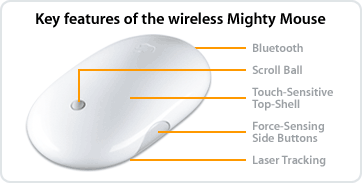 While the MacSheep blogs are hyping the release of Apple's new wireless mouse, I think it's time to throw some cold water on the pack to wake them up.
Fact one: this product should have been released years ago and has been conspicuously absent while vendors like Logitech and Kensington have had advanced wireless mice on sale for the last 4 years.
Fact two: BlueTooth may not be an advantage over other wireless protocols for mice. I've been pushing for decent BT mice for quite a while, after seeing some very mediocre products released. So far, they have either been too expensive, too quick to drain the battery, or bad performers in the tracking/sleeping game. Apple has to get all three of these right in order to impress me and other folks. At ¥8700, they are not off to a good start.
Fact three: The MightyMouse form factor is not particularly enamored by most Mac users I know. The two button function doesn't function correctly all the time, and the side buttons are awkward to access. The stoopid scroll ball is not easy on the fingers will eventually get jammed up by some microscopic particle. Yeah, Ok, I read how to clean it and I suppose I could wash my hands every time I use the mouse - but the fact is that I DON'T HAVE TO DO this with any of the Kensington mice I use (or even my mediocre BlueTake BT500).
Perhaps the "Laser Tracking" feature will give use something the wired MM doesn't - I'm not sure. But there are other laser mice out there. Let's hope that this is a good feature and an improvement over the wired MM that couldn't track on the surface of my wooden desk.
I don't know - maybe I expect too much from Apple. But I just don't feel the MM form factor is that innovative or in any way superior to other mice. And though I'm happy Apple has improved its mouse line, it's very late in coming.
Monday, July 24, 2006
Product Review: I-O Data GV-1394TV/M3 - as kludgy as its name
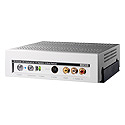 In my quest to find the ultimate Analog-Digital nirvana, I purchased a different video converter box a couple of weeks after returning the EyeTV200. I decided to go with a product designed by a Japanese company, so that it might work better with Japanese cable set-ups. I bought the recently released I-O Data GV-1394TV/M3, I-O Data's latest iteration of their firewire video converters for Mac. I'd seen this running at a couple of Akihabara Mac vendors, so I assumed it was pretty good. It was much cheaper than the EyeTV200 at ¥26,000, so less punishment on my credit card. It also has a pretty good rating on the Apple Japan Store website.
The GV-1394TV/M3 is a relatively large device, as deep and a bit broader than a Mac Mini. The case is solid metal - so it's a brick. There is an LED power switch on the front of the unit, so you can easily turn it on and off with a touch. There is also an LED switch to go between antennae and S/analog input. This converter connects with firewire to your Mac, but it's powered from an external power adapter. Portability is not its strong suit. The box has inputs for antenna coax, S, and composite analog video. There is no remote, but you can purchase one separately.
Setting up and installing the GV-1394TV/M3 was not so easy. I don't read much Japanese, but could get through the process with a bit of trial and error. Plugging in the connectors was no big deal, but the GV-1394TV/M3 software was no party. This product relies on six different apps to do what the EyeTV did with one app. The list includes:
TV視聴・録画ツール「DigitalTV Recorder」
チャンネル制御ツール「Channel Commander」
予約録画ツール「Channel Manager」
ムービー統合ツール「MergeUtil」
CMカットツール「Ulead VideoTrimmer」
iPod対応オリジナル変換ソフト「GVencoder for iPod
Channel Manager is a scheduling app that boots up each time you login on your Mac. Channel Commander is for setting up your channels and controlling what is active (channel or video input type). DigitalTV Recorder is for recording whatever it is you are inputting. The other utilities are for video editing and saving videos in iPod compatible format. However, none of these apps has a very friendly or clear interface. Butt ugly...
The actual process of setting up channels is a bitch. For terrestrial analog, you have to select what region and subregion you are in, then wait forever while Channel Manager searches for them all. Then, you are expected to label all the channel IDs yourself via pull down menu. If you decide to leave any blank, it won't finish the set up. :-( Our antennae connection yielded a ghosty image, so the supposed 'Ghost Reducer' feature must have given up the ghost. Connecting your cable coax to the box, then scanning for channels also takes a long time (longer, actually because there are more channels). Unfortunately, like the EyeTV200, only BS channels were unscrambled. I'm not sure the point of having a device that can scan and save 64 channels, when 50 of them can only yield audio. However, we have digital cable (like 85% of Japan) so this shouldn't have been surprising.
The lack of cable channel control didn't discourage me, as I intended to input my analog signal off the cable box instead. Shockingly, this didn't work at all. Switching from antenna channel input to S video or composite analog input from the cable box resulted in a half second of video then a frozen picture, with the 'converter' LED blinking a 'no connection' warning. I tried every variation of analog feeds from the cable box, from using S video, to routing it through the VHS recorder, to using the TV output. I even tried different cables with different lengths. Nothing worked. WTF!
I then assumed that something was amiss with the converter hardware. However, I found that VHS recording output from the VCR did produce an analog signal that the GV-1394TV/M3 could input and record. So, apparently this wonder box can detect broadcast signals, even routed through other devices, and prevent you from inputing it. My guess is that this "feature" keeps the broadcast and other media industry in Japan from demanding royalties or something ridiculous like this. I couldn't find any clear explanation of this in the documentation, and my Japanese translator's (my wife) patience with technical manuals was pretty short. So, I decided to return this unit as well, after a week of fiddling. I'm sure the Yodobashi clerks were not happy to see me at the return desk twice in a month.
As far as the video recording and editing functions, I only used the DigitalTV Recorder app. I had difficulty figuring out which format was best for initial recording, and found it very slow to get up and running, compared to the EyeTV software. I can't comment on editing functions, as I didn't use them. Perhaps most people would be interested in the iPod video capability. Again, I didn't use these features, but would think that if you could only input a VHS signal or broadcast TV channels- there isn't much worth recording for an iPod. Remember, DVD material can be played/converted directly by your computer.
So... you can guess my conclusion here. If your needs are rather narrow, the GV-1394TV/M3 might fit the bill. However, I think most people would not find this device useful and the software frustrating.
Nothing to see here... move along now.
Sunday, July 23, 2006
Product Review: EyeTV200 Falls Short
 I bought this product in order to edit some VHS video material (baby ultrasound), and view a bit of TV on my 20" iMac while I work. I used it for a week, before deciding to return it.
In Japan, there are several products available for Analog to Digital conversion, some with TV tuners, some with Mac compatibility. Most of these are under ¥30,000, but the EyeTV200 is sold for ¥40,000. In fact, this is higher (¥10,000) than what you'd pay outside Japan for the same model - if you can find it. I say 'if', because ElGato has phased out the EyeTV200 and replaced with the newer EyeTV250. So the 200 appears to be obsolete everywhere but Japan. Go figure.
This product is easy to set up and use and comes with EyeTV Software version 1.8X from ELGato. It comes with a firewire cable, and short antennae cable so you can attach it to VCR or antenna connector. Setting up the TV channels is also easy for both antennae and cable.
Unfortunately, the EyeTV200 cannot 'descramble' cable signals, so it only works with BS cable channels, at least with JCOM. Actually, it finds all your channels, but you get a snowy video feed for non BS stations (no pun intended). However, you can take your analog signal from your cable box and feed it to the EyeTV200. This leaves the EyeTV200's remote somewhat useless, but you can change channels with your cable box remote.
Another shortcoming is the software. The included EyeTV software (EyeTV 1.8x) will not allow you to save to mpeg4 format and freezes. Also, it cannot save to the current format of iMovie, and you get an error message when it opens iMovie after you try to do so.
The EyeTV v1.8x is software also outdated - everywhere but Japan. You can go to ElGato's site to get the latest 1.8x (1.8.2, IIRC). And ElGato offers version 2.0 for purchasers for of the EyeTV200 since last year - except for in Japan. Roxio Japan runs the support site for the EyeTV200 in Japan. However, there are no free upgrades to EyeTV2.0 or much anything else other than FAQs on the Roxio site. They don't even mention v2.0, even as a purchase. I can't understand this.
Hardware-wise, the EyeTV200 has good and bad points. The converter box is lightweight, lowe profile, and is powered by the firewire data cable. However, box always draws power and gets quite warm, even when you turn it off with the remote. The only way to get it to stop drawing power is unplug the FW cable. The box also has the expected inputs for analog, S-Video, as well as antennae coaxial. There are no video outputs, unlike on other converters, but this may not be so important.
Good question. I later purchased a Japanese-made I-O Data converter for Mac (GV-1394TV/M3) after returning the EyeTV200. It was less expensive (¥26000) and made by a Japanese company, raising my expectations. Unfortunately, the GV-1394TV/M3 came up very short. (Check back later for a review on this converter.) But I can't recommend either of these products at this point.
There are several other video converters available in Japan for Macs, all less expensive than the EyeTV200. Unfortunately, none of ElGato's more advanced products are available here, even the EyeTV250.
Friday, July 14, 2006
King of Comments

Wow! It was my lucky day yesterday. I was King of the comments on The Show (July 12).
*Sigh*
Fame is fleeting...
Tuesday, July 11, 2006
iUseThis - Cool Mac Site
 I've been busy lately - not much time to post - but gathering lots of materials. Sorry for the silence.
Anyway, I caught this site mentioned on PowerPage - iUseThis - a site for Mac users with an interesting tweak on the social networking angle. Basically it maintains a list of MacApps and a database of which registered members use them. You can submit the apps you use which are missing, and select other users of your favorite apps and designate them as 'friends'. You can also make comments and suggestions to app postings.
There doesn't seem to be a way to see or search the entire Friends list for particular users (at least when I tried it), so adding "Friends" is difficult. I could only do this by looking at the user list for each app. There is also a "neighbor" list, but I'm not sure what this is. There is also a "Recommended Application" list for registered users, but it didn't seem to be functioning. (It said, "Not enough data to determine recommendations" or something like that...)
Loading app data is a bit problematic, as you have to cut and paste URLs from another browser window. And loading program icons was confusing. I assumed you could select the program via the browse button and it would snatch the icon. Unfortunately, this gives you an error when you submit. Also jpegs don't seem to work - you have to get the icon in .png format. So, what you get are not real icons, but screen captures of icons or website graphics. Perhaps they have some of these bugs worked out.
The site got a lot of hits yesterday, and apparently it is offline today for maintenance. Let's hope that they get it up so everyone can try it. I'm also hoping they'll add more features, like adding your blog links to your profile, and a way to see what web SITES are most popular with Mac users. Or even music, hardware or related things might be neat to add.
Anyway - go check it out when they get back on line! Looks like it's up now.
Saturday, July 01, 2006
Free iClip on MacZot
 iClip is a third party app that works as a multiple clipboard and scrapbook and was featured on a previous MacZot promo. Now you can get this $20 app for FREE at MacZot for the next few days.
Apparently, the developer of iClip will be releasing version 4 soon, so they are giving away the current version 3.
Tuesday, June 27, 2006
No Surprise
This is no surprise - that the company (Foxconn) that runs Apple's iPod City in China lied to cover its ass, and apparently is even in violation of Chinese laws.
Strangely, AppleInsider is reporting that Apple has found no problems with their iPod factories, but this seems to be a quote from the Foxconn boss, not Apple. (Way to botch your headline, AI!)
Strangely, AppleInsider is reporting that Apple has found no problems with their iPod factories, but this seems to be a quote from the Foxconn boss, not Apple. (Way to botch your headline, AI!)
I'll be surprised if: A) anything is done about this situation, B) if anyone bothers to notice that this is a common practice in all such situations in China.
Thanks to Engadget for the follow up.
Friday, June 23, 2006
Diet Coke + Mentos = Sploosh
Wednesday, June 21, 2006
Boom!
Maybe I spoke too soon about Dell laptops. Sure we've heard about MacBook magnetic power cables catching fire, but nothing like a laptop virtually exploding after catching fire.
See this article on such an incident with a Dell at a conference in Japan and the photos taken by an attendee.
I'll have to rethink actually putting these damn things on my lap at all.
See this article on such an incident with a Dell at a conference in Japan and the photos taken by an attendee.
I'll have to rethink actually putting these damn things on my lap at all.
Windoze Laptops Continue to Impress
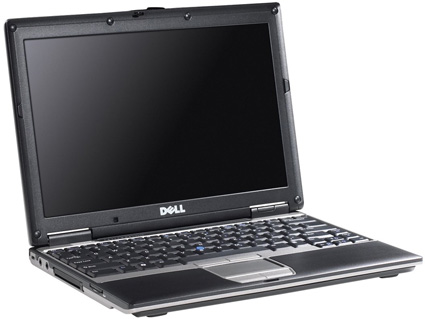 I continue to be surprised at the idiocy some MacFanboys have for Apple products that are mediocre, like the MacBook. This article on TUAW talked about how Dell and HP and other Windows laptop vendors are shaking in their boots because The MacBrick got a good review by a BBC journalists. Although I agree the MacBook is something unique for Mac users, Windoze laptops are still ahead of the game, even in the consumer line.
Don't get me wrong - I think the MacBook is an accomplishment for a consumer laptop for Apple, simply because they don't have any other consumer laptops.
One of the complaints I get about my "MacBook is too heavy" line is that it would cost too much to make a light MacLaptop. This doesn't really seem to fly, when you actually look at what's out there. Check out recent posts on Engadget for consumer core solo/duo laptops. Epson has a 14"
core duo that weighs less than 4lbs and goes for about one thousand bucks. Hell, even Dell has a 12" 3lb laptop that runs a core solo with a 7 hour battery life for about $1300. And even Gateway has a similar offering as Dell.
Yeah, you can complain that the screens of the latter two are smaller, but for those of us who WANT a light-weight portable to replace our aging 12"G4 PowerBooks - their feature sets are superior to the MacBricks in every way but one - they can't run OSX.
So, sorry TUAW and blinded MacFanboys, these vendors don't have much to be worried about at all, other than an inability to run OSX.
Monday, June 19, 2006
Apple's QC Slipping
 Lately I'm really starting to worry about the quality of recent Apple products. In the photo here is my pair of Apple's lanyard earbud headphones - or part of them. You can see that the fabric sleeves that normally slide over the headphone wires have come out of the plastic braces that hold them. I've had these headphones for several months, and they've gotten almost daily usage. However, I'm also very careful with them. I'll have to see if I can rectify the problem with SuperGlue.
I also have the 'In-Ear' Apple lanyard headphones and have been unhappy with these since day one. The first thing that happened to them was the cloth sleeve popping out of the clamp that holds them. It was a bitch getting them back in place, and I damaged the clamp. Then there is the sound problem with this pair. Essentially, it sucks. I had assumed they had the same speakers and drivers as the bud style. But the sound is very tinny, and I'm noticing that the left one's volume is lower than the right one.
Maybe I wouldn't give a rat's ass if these were cheap headphones, but they are rather expensive in my opinion - $39 and $49 for the In Ear. I've been happy with the sound of the standard bud style headphones, but this falling apart stuff is ridiculous. And it really makes no sense to me why they charge more for the In Ear when they are clearly inferior (at least mine are).
Unfortunately, you can't get any money back on these as once you open them they are non-returnable and don't have the same warrantee that is found on Macs and iPods (as far as I know).
What about Apple's other products? Well, we all have heard about problems with plastics on iPod nanos and the new MacBricks, err - MacBooks. I know plenty of folks with problematic iPods and PowerBook screns. There were also problems with recent 15"
PowerBook logic boards, but it's not clear to me if these are isolated incidents or serial problems. But what I'm wondering about, is if Apple's increase in manufacturing and use of mass-production opportunities in China are leading to some lapses in quality. There were times in the past where Apple product quality was suspect - but I have to hope they would at least maintain product quality as their profits have risen.
Let's hope this isn't a recurring theme in future products.
Saturday, June 17, 2006
HoudahSpot
 My mini review of HoudahSpot as seen on MacZOT.com
MacZot is having their latest Blogzot for the Spotlight alternative "HoudahSpot". I gave HoudahSpot a quick spin and found that it has some interesting search alternatives absent from Spotlight, and a unique set of tabbed windows (Browser, Inspector, and Preview) you can switch between to view files. I especially like the Browser window, which allows you a quick view of any standard text or graphic file. Give it a try, as the demo version allows you 30 free search queries.
NOTE: If you're seeing this on June 16, 2006 head over to MacZOT, you might be able to get a Free copy of HoudahSpot
Search easily in Tiger, Mac OS X, with HoudahSpot
Thursday, June 15, 2006
"Ultra-Portable" Mac?
AppleInsider is reporting that Apple may be poised to introduce an "ultra-portable" Mac - but in January at MacWorld.
January.
*sigh*
January.
*sigh*
pzizz iPod blog II
I mentioned before that I would be using Pzizz to help me get to sleep. Well, I've done so three nights since, and found it to be useful in calming my head down. I often lecture until 10pm, and work at home late, often past 3am. Before sleeping, I might update this blog or my websites, and sometimes I'll sneak in a game on my PSP in bed before turning in. Unfortunately, I can't always sleep right when I want to and often feel frustrated that I didn't try to sleep earlier. I've created three Sleep naps in Pzizz so far, exported them to iTunes, and put on my iPod nano. I've notice that even when I'm agitated, Pzizz makes me drift off rather quickly. The downer for getting to sleep this way is keeping the headphone wires from tangling up me or my wife. I also can't really credit Pzizz with giving me a better sleep, just getting me to sleep faster.
The variation in 'naps' remixes some of the musical/sound themes as well as the vocal content. It's all the same voice - so I guess I have to hold out for a female voice in future versions.
I've yet to try an Energizer nap, mostly because I don't nap much during the work week. Hopefully, I'll get a chance to try one of these before I jump on the train to work. Or maybe ON the train if I can get a seat.
The variation in 'naps' remixes some of the musical/sound themes as well as the vocal content. It's all the same voice - so I guess I have to hold out for a female voice in future versions.
I've yet to try an Energizer nap, mostly because I don't nap much during the work week. Hopefully, I'll get a chance to try one of these before I jump on the train to work. Or maybe ON the train if I can get a seat.
Subscribe to:
Posts (Atom)